Bilingual Power BI report
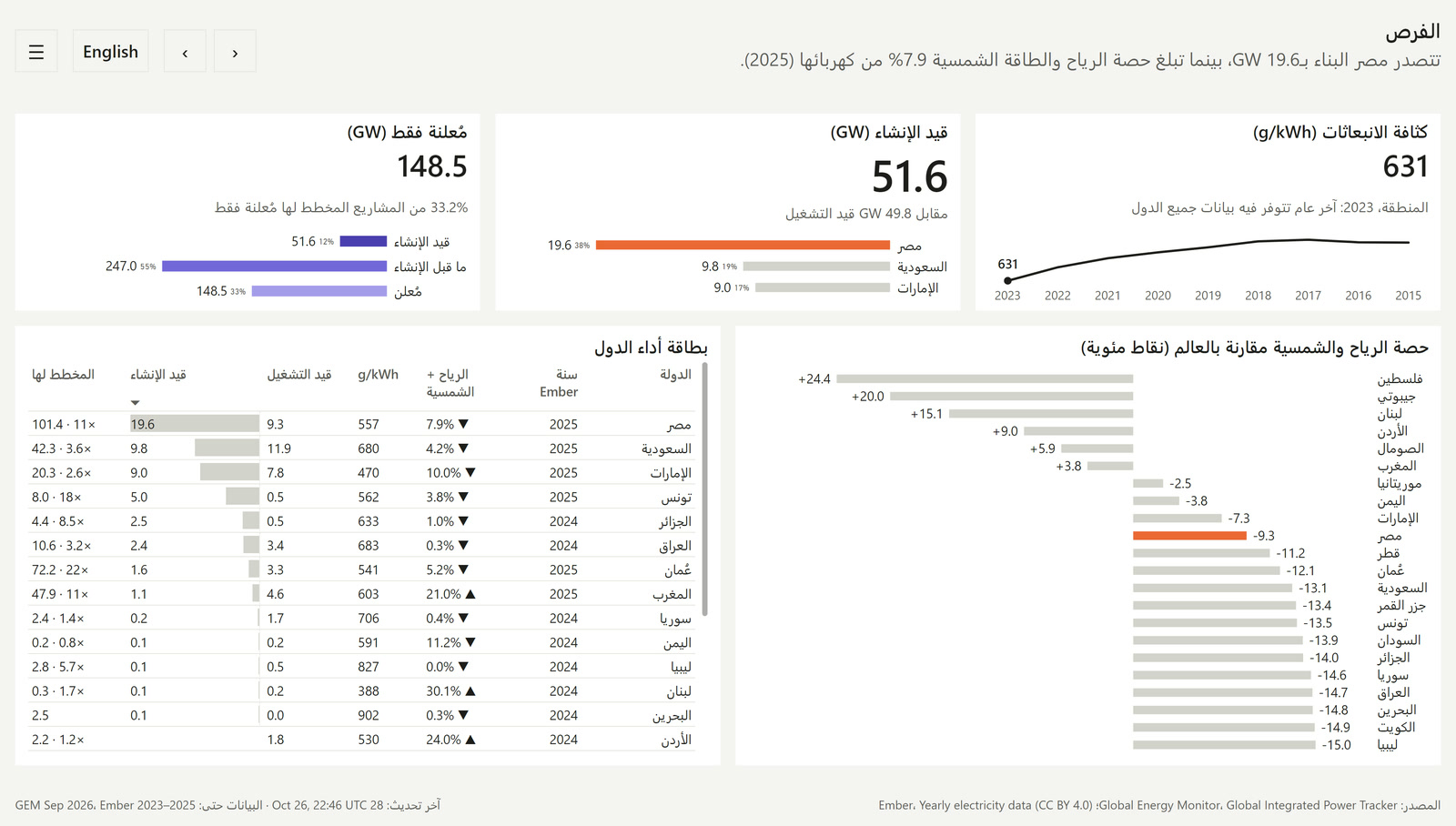
Renewable power across the 22 Arab League countries, in English and Arabic.
Problem
Based on a real client report
I delivered English and Arabic Power BI reporting for JLL's international government account. This is an AI-built version on open data that shows the same principles. It is not that client's report, and it uses no client data, visuals or text.
The aim is to show the data model and the decisions it takes to render one report in two languages when the layout changes, not just the text.
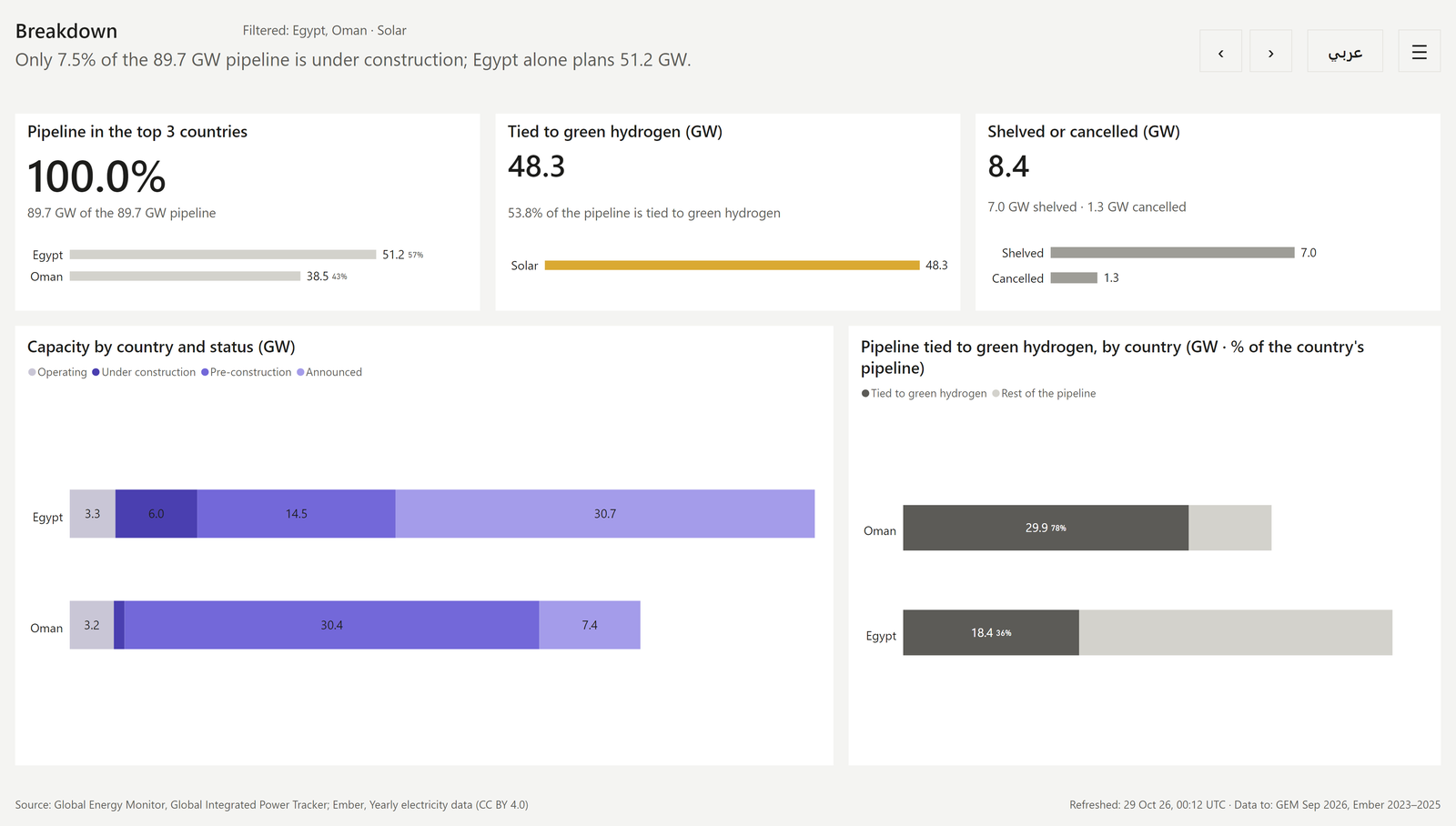
Arabic reads right to left, so an Arabic page is a mirror of the English one: visuals swap sides, bars and time axes run right to left, and table columns reverse. A language switch on a single page would only change the words and leave the layout as it is. So every view has an English page and an Arabic page, and a script generates the Arabic page from the English one.
The report itself is written for a market-screening team at a renewable-energy developer or investor deciding where to spend business-development effort in the Arab League over the next two to three years. It supports four decisions: which countries to prioritise, which technology to lead with, how far to trust the pipeline, and who is already active. Every number and headline has to match across the two languages.
What I did
I chose the problem, the persona and the four decisions. I directed Claude Code through the project one phase at a time: dataset, business questions, visual guidelines, semantic model, then each page. At each phase the agent set out options with a recommendation and I chose. When it ran ahead early on, I stopped it and made "decide each phase together" a standing rule.
Claude Code wrote the scripts, the model and the report definitions. I reviewed the rendered pages, not the code, and asked for changes. I then had the agent check the report against a data-visualisation checklist, and that review became version 2.
How it works
The report is written as code (a Power BI project with the report in PBIR and the model in TMDL). build_report.py writes the four English pages. mirror_pages.py turns each one into its Arabic twin: positions mirrored, text right-aligned, bars and time axes running right to left, table columns reversed, fields swapped to their Arabic columns, and navigation re-pointed to the Arabic pages. A design change is a change to a script, so it applies to all eight pages at once.
Every build is validated against Microsoft's PBIR schemas, deployed to a development workspace with the Fabric CLI, refreshed, and exported to PNG for every page. Renders caught what the schemas can't, such as labels running into bars and Arabic legends in the wrong order.
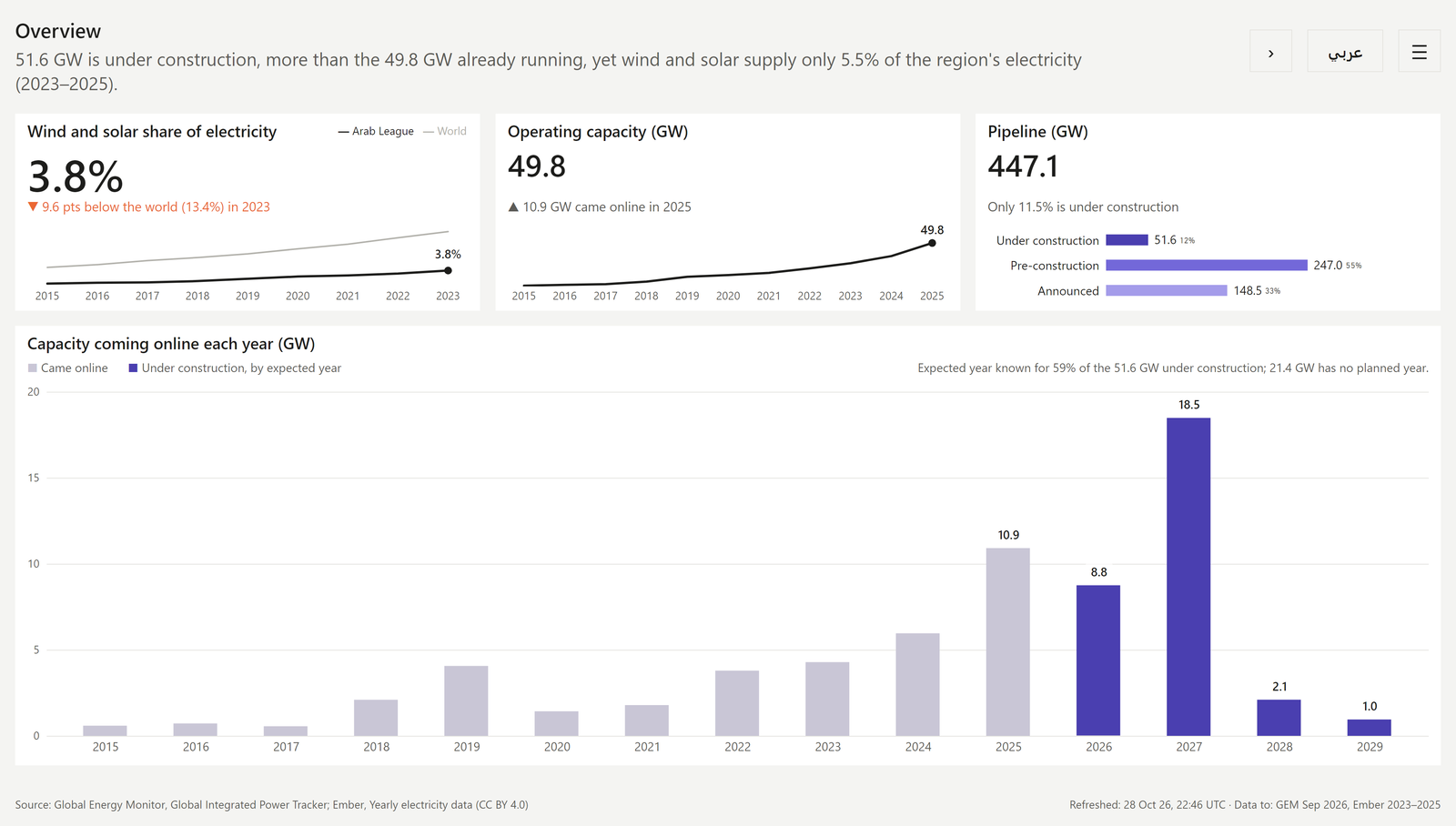
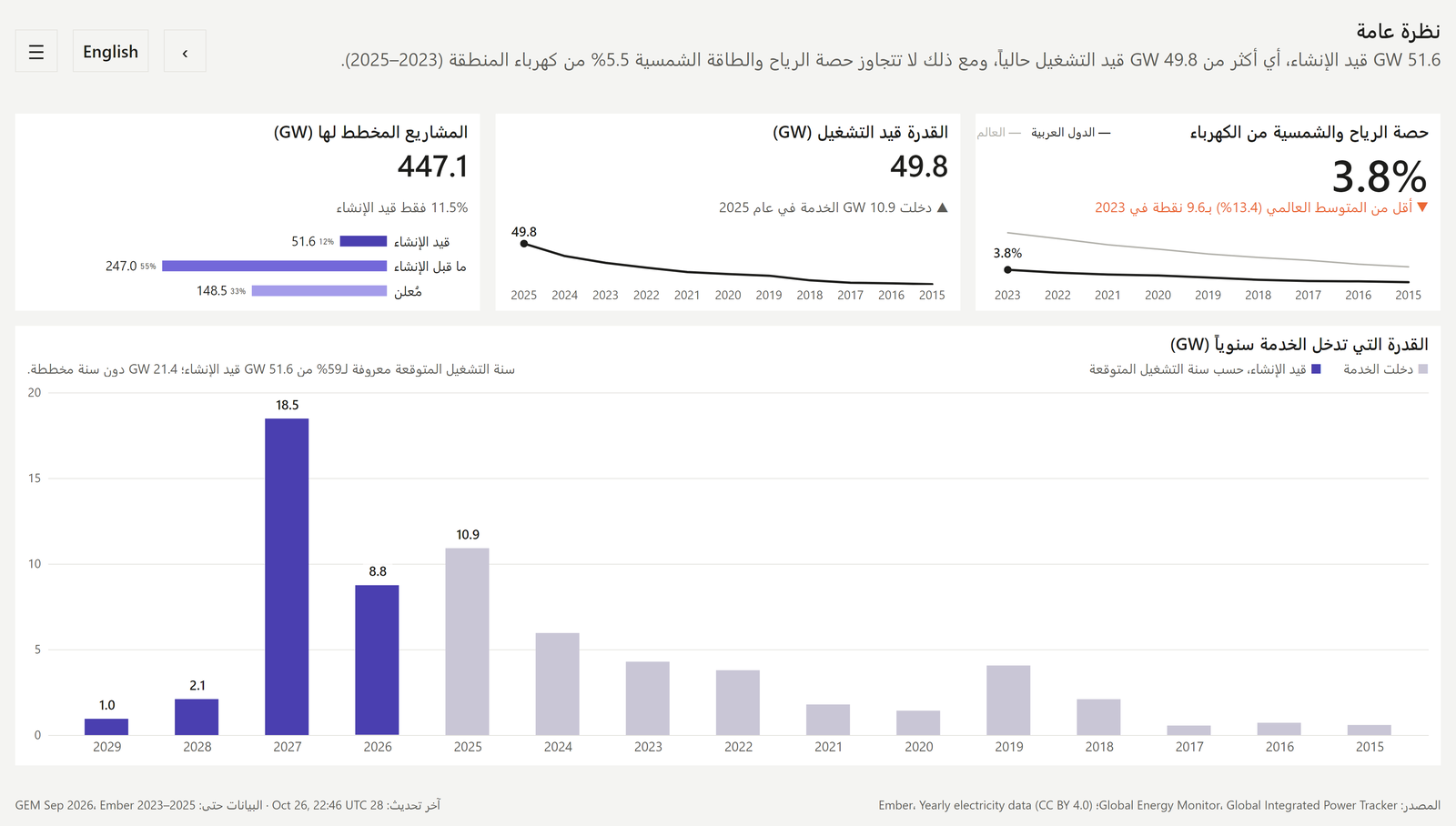
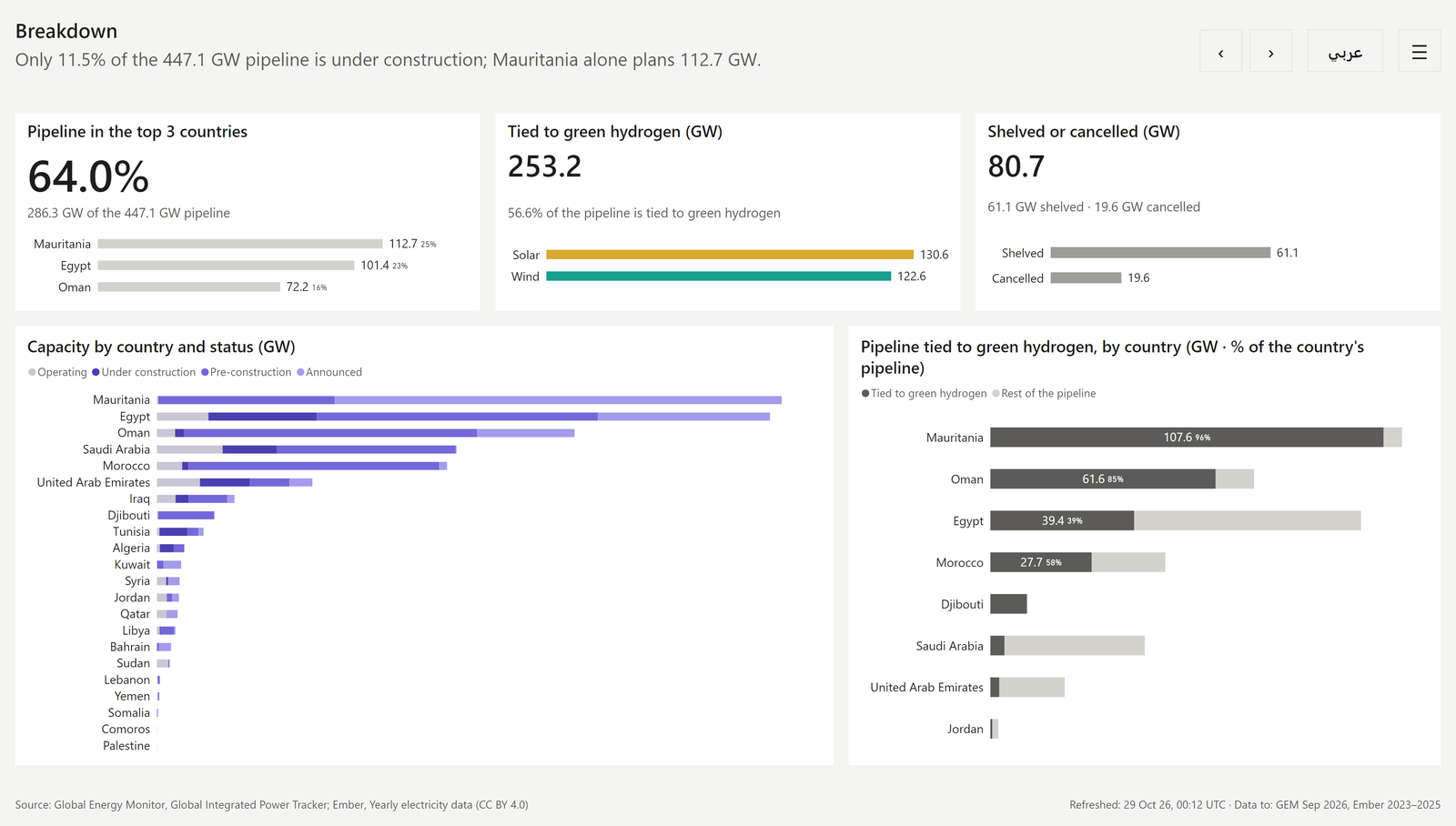
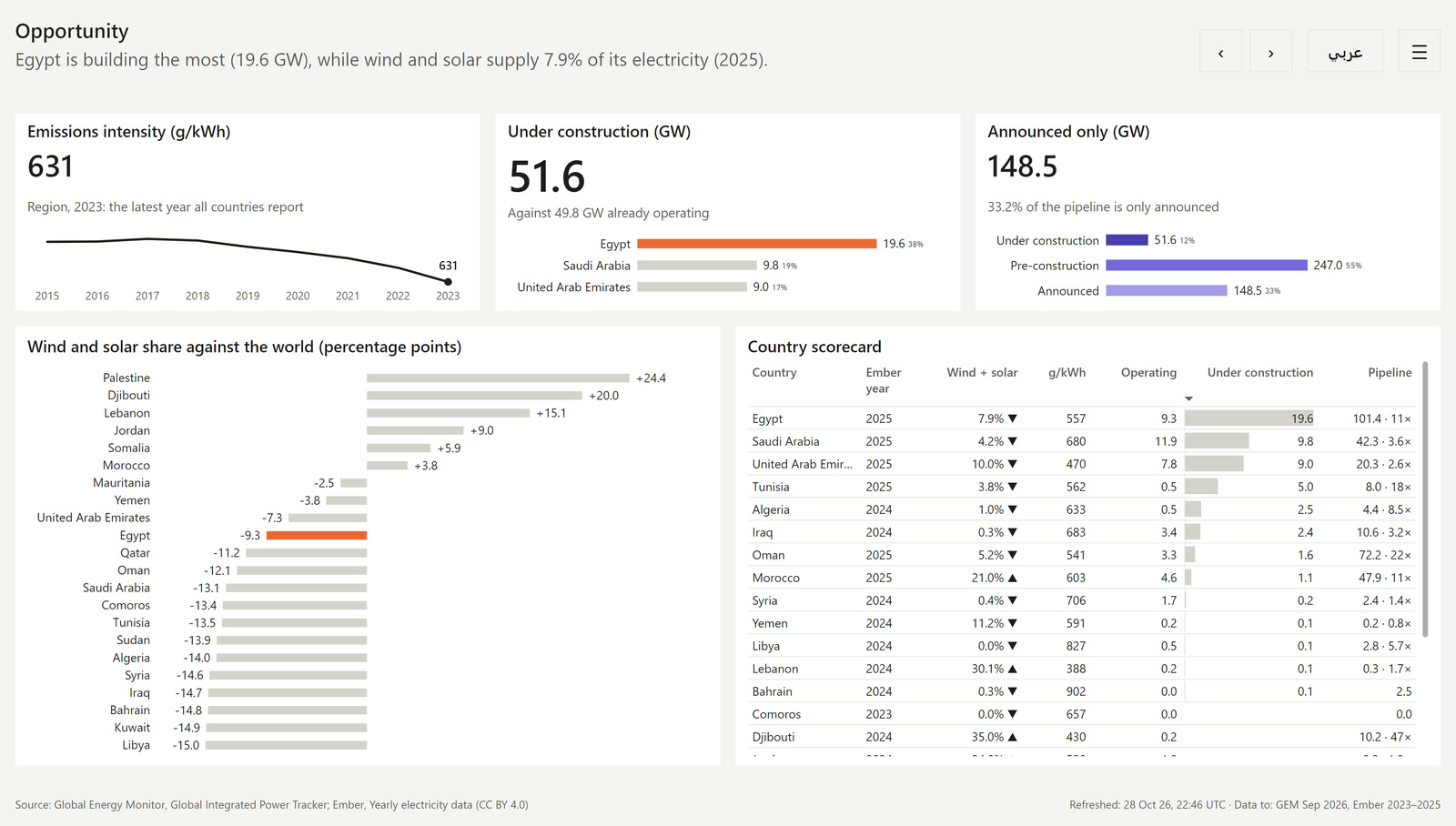
The four pages are Overview, Breakdown, Opportunity and Projects. Each opens with a one-sentence finding that rewrites itself when a filter changes.
The semantic model
The model is what makes two languages possible from one report. The pages only choose which language to show. Everything else is decided in the model.
- A star schema at unit grain. The fact table has 957 rows, one per unit (phase) as Global Energy Monitor publishes them, across 758 plants. Status and capacity belong to units, and one plant can have units at different statuses.
- An Ownership bridge. One row per unit and owner, with the owner's share. Owner GW is capacity times share, so owner totals add up to real capacity.
- EN and AR column pairs, with provenance. Each dimension has an English and an Arabic column, such as
CountryandCountry AR. Every Arabic column has a provenance column:source(GEM's own Arabic name),machineorreviewed. Arabic pages swap their fields to the Arabic columns. - A disconnected Language table. It holds
enandar. Each page carries a page-level filter on it,enon English pages andaron Arabic pages. Text measures read that filter. There is no language slicer. - A Translations table for UI text only. Titles, headlines, labels, notes and menu text. Names of countries, technologies and plants live in the dimensions.
- Every measure lives in the model. About 90 of them, so the report also works with Publish to web.
Static text and dynamic text
Text splits into two kinds, and each is translated in a different place.
| Kind of text | Examples | Translated |
|---|---|---|
| Static | Axis titles, column headers, legend titles, KPI labels, menu and footer labels | At build time. The script writes the Arabic text from the translations file into the Arabic page definition. No DAX. |
| Dynamic | Headlines, KPI status lines, refresh time, Ember year labels | At run time. A DAX measure fills a translated template with {placeholders} and picks English or Arabic from the page's Language filter. |
Each headline also picks its template by threshold before it fills the placeholders. "Only" appears when under 25% of the pipeline is being built, and "more than" appears only when construction exceeds operating capacity.
I rejected TMDL cultures (model translations). They switch by the viewer's browser language, not by page, and Publish to web doesn't support them. I also rejected separate tooltip pages per language, because that doubles the tooltip pages.
Design decisions
The repo keeps two decision logs, 18 for the model and 35 for the visuals. Nine of them, each as decision then reason:
- Language is set per page, with no slicer. The language button switches pages, and each page carries its own fixed language filter.
- Translation changes words only. Numbers, units and dates are identical in both languages, with Western digits and
28 Oct 26dates. Only the words change. - Everything mirrors, including time axes. Time axes, bars, table columns and navigation all flip. Arabic text is 1 pt larger at sizes of 16 pt and under.
- Arabic sentences get a right-to-left embedding. Power BI text boxes are left to right, so a sentence that starts with a number comes out in the wrong order without it.
- Colour has fixed roles. Technology, project status, one accent and neutrals each have a job, and every categorical palette went through a colour-vision-deficiency validator. The same colour means the same thing on every page.
- Headline wording changes at thresholds. A fixed sentence would say "more than" when it isn't true.
- The fact table is at unit grain. Status belongs to units, so a plant-level table would hide plants that are part operating and part planned.
- Data comes from raw GitHub CSV URLs. A refresh in Fabric needs no gateway. The cost is that the repo must be public and a moved file breaks the refresh.
- Version 2 came from a dataviz review. The Opportunity scatter's labels overlapped, so gap-to-world bars replaced it. The Overview chart gained the capacity expected online to 2029, because the persona plans two to three years ahead.
The full logs are in the repo: semantic model and visual guidelines.
Results and limits
The report delivers what it set out to: eight generated pages, one model, two languages. The findings below describe the data (Global Energy Monitor, September 2026; Ember), not my results.
- operating, 22 Arab League countries
- 49.8 GW
- under construction
- 51.6 GW
- of the 447.1 GW pipeline is under construction
- 11.5%
- wind and solar share of electricity, 2023, 9.6 points below the world
- 3.8%
- of the pipeline is tied to green hydrogen
- 56.6%
Limits:
- The Arabic is machine-drafted. Every Arabic string is flagged
machineuntil a native speaker reviews it, and none is marked reviewed without a real reviewer. - The expected online year is known for 59% of capacity under construction. The Overview chart says so next to the bars.
- Slicers show "Select all" and "All" in English on Arabic pages, because those words come from Power BI.
- This is a personal portfolio piece with no users. It was rebuilt in a personal Microsoft tenant on public data only.
Stack
Skills, CLI and APIs
What the agent worked with while building the report.
- Agent skills
- Data Goblins' power-bi-agentic-development: the
pbipplugin (the PBIR format skill and its references, and the TMDL validation hook) and thefabric-cliskill. - Claude's
datavizskill: the chart checklist behind version 2 and the colour-vision palette validator. - CLI
- Fabric CLI, to import each build into a development workspace and refresh it.
- Python build scripts:
extract_data.py,build_report.pyandmirror_pages.py. - Git and the GitHub CLI.
- APIs and schemas
- Microsoft's PBIR JSON schemas, to validate every build.
- The Power BI REST API, to export every page to PNG for review.
- MCP
- None for this project.